Beginner Basics
How to Read an AMC 72-Hour Schedule
How to read the AMC 72-hour schedule for Space-A travel — what each field means, when the board updates, and how to use it to plan a real trip.
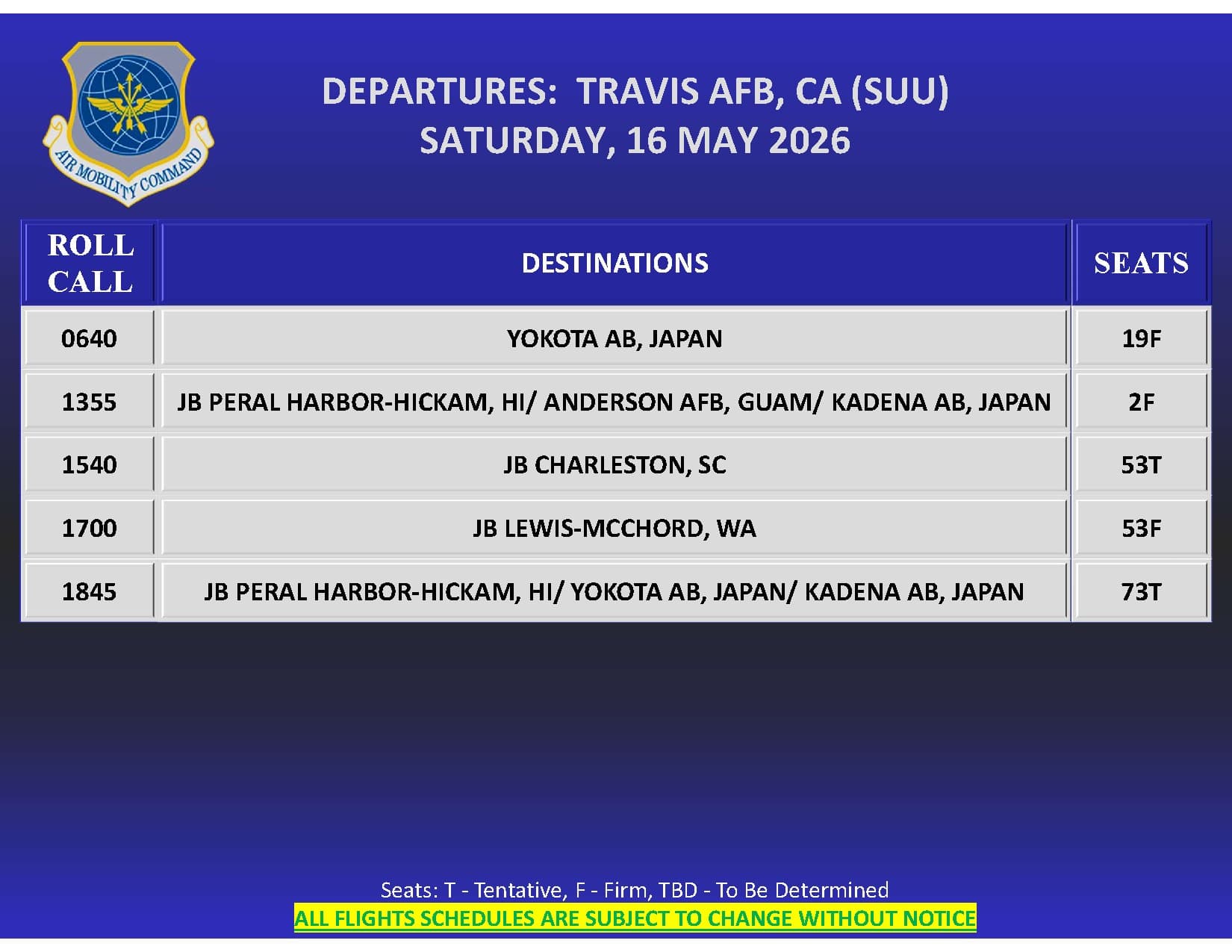
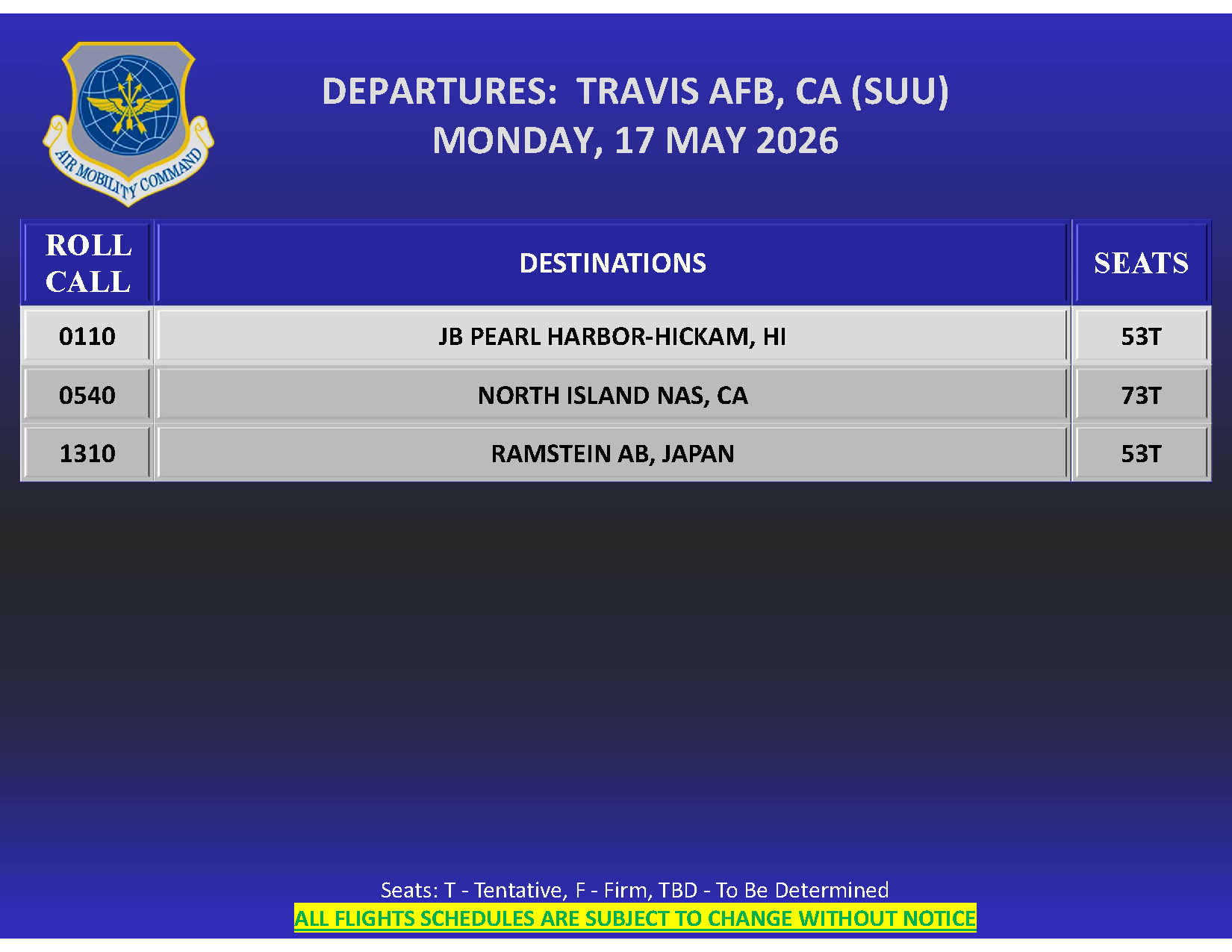
Image: Air Mobility Command 72-hour departure schedule, Travis AFB, 16 May 2026. Public domain — sourced from amc.af.mil.
The 72-hour schedule is the single document Space-A travelers use most. It tells you what's posted to fly, where it's going, when the roll call happens, and roughly how many Space-A seats are listed. Reading it isn't difficult — there are only a handful of fields, and the format is consistent across terminals.
What is genuinely tricky is making sure you're checking the schedule at the right moment. Schedules update throughout the day as missions get added, retimed, re-tasked, or cancelled, and the most useful information — confirmed roll-call times, refined seat counts, late additions — often appears in the 24 hours before departure. A schedule glanced at once 48 hours out and not rechecked is the most common way travelers miss a flight they could have made.
This post walks the fields, then covers the timing piece. We use the Browse Flights board for examples — but everything here applies equally to a terminal's own AMC page or any other source that republishes the same data.
Where the 72-hour schedule actually comes from
Every AMC passenger terminal publishes its own rolling 72-hour forecast of departing flights. The forecast is produced from internal AMC mission tasking and updates as missions are added, cancelled, retimed, or routed differently. The authoritative source is each terminal's official AMC page (most terminals also publish a 72-hour PDF).
A note on terminal Facebook pages: many terminals used to mirror their 72-hour schedules to Facebook, but most have moved away from that and now post schedules only to their official AMC sites. If you've been relying on a terminal's Facebook page, double-check it's still being updated — when in doubt, the terminal's own AMC page is the source.
Space-A+ aggregates from official AMC channels and refreshes every 10 minutes, which is why a flight that posts to the terminal site usually appears in the Space-A+ board within minutes rather than hours.
One conceptual point worth keeping straight: the 72-hour schedule shows outbound flights only. Inbound arrivals — flights coming into the terminal — are listed separately. Inbound arrivals are a useful leading indicator, since a crew that just landed often departs again the next day, so watching inbound flow can predict outbound capacity 24 hours before it appears on the schedule.
The fields on a 72-hour schedule
The exact format varies a bit by terminal, but the data does not. Every flight row contains some version of:
1. Roll-call time. The time you need to be at the terminal counter. Per DAFI 24-605V2 § 2.13 (the 2h-20m floor) and § 2.34 (Space-Available roll call), no roll call can happen closer than 2 hours 20 minutes to scheduled departure. Most terminals run roll call earlier than the floor. The roll-call time on the schedule is what you actually need to be present for, so it's the field to anchor on. Note that 72-hour PDFs typically list the roll-call time directly rather than the scheduled departure time.
2. Destination(s). Usually shown as place names — Ramstein, Yokota, Kadena, Hickam, Dover. Some terminals also include airport codes alongside the name (e.g. SUU for Travis, RMS for Ramstein). Multi-stop missions are common and the destinations list typically shows each stop in order — the seat count usually applies to the first stop, but the flight can sometimes deplane passengers at intermediate stops if you're eligible for that destination.
3. Estimated Space-A seats. This is the number that gets the most attention. A few things to keep in mind:
- The number is an estimate, not a guarantee. It changes as cargo, official-traveler bookings, and weight allowances shift.
- A "19" on a cargo aircraft is almost always the DAFI 24-605V2 § 4.7.5 cap — load planners must leave a pallet position open for baggage when carrying 20+ passengers. The actual number can rise if Space-A travelers pack light enough that baggage can be floor-loaded.
- A "0" means no Space-A seats currently estimated. The mission may still release seats at roll call. Don't dismiss it entirely, but don't plan a trip around it either.
- A "TBD" means the seat estimate isn't available yet. Often resolves to a real number 12–24 hours before departure.
4. Update timestamp. Most boards show an "as of [time]" or similar timestamp indicating when the data was last refreshed. This is the single most overlooked field. A 12-hour-old timestamp on a flight 24 hours from departure tells you the data is stale — anything could have changed. Always check the timestamp.
The Space-A+ board updates every 10 minutes from terminal postings; the timestamp shown is current to that cycle.
The widget below shows the full column legend, including the seat-status codes you'll see (F = Firm, T = Tentative, TBD = To Be Determined):
How to read an AMC 72-hour schedule
| Column | What it means |
|---|---|
| Roll call | When the terminal calls names by category and sign-up date. Be present 60–90 min before this time, ID in hand. |
| Destinations | Listed in order of route. A flight "Travis → Hickam → Yokota" is one mission with two stops — you can roll-call for either. |
| Seats | Forecast count released to Space-A. Final number is announced at roll call; it can grow or shrink based on cargo, crew, and ID checks. |
| Seat status | Letter code(s) from AMC describing the flight's confidence level. Some flights stack multiple codes; the confidence code (F/T/TBD) is the one that tells you whether to plan around it. |
Seat-status code legend
| Code | Meaning | Note |
|---|---|---|
| F | Firm | Most likely to fly as scheduled. |
| T | Tentative | |
| TBD | To Be Determined |
What an actual 72-hour PDF looks like
Here's a real Travis Air Force Base 72-hour schedule PDF from May 2026 — the exact document a traveler would download from amc.af.mil. Four pages.
📄 Download the example PDF (870 KB)
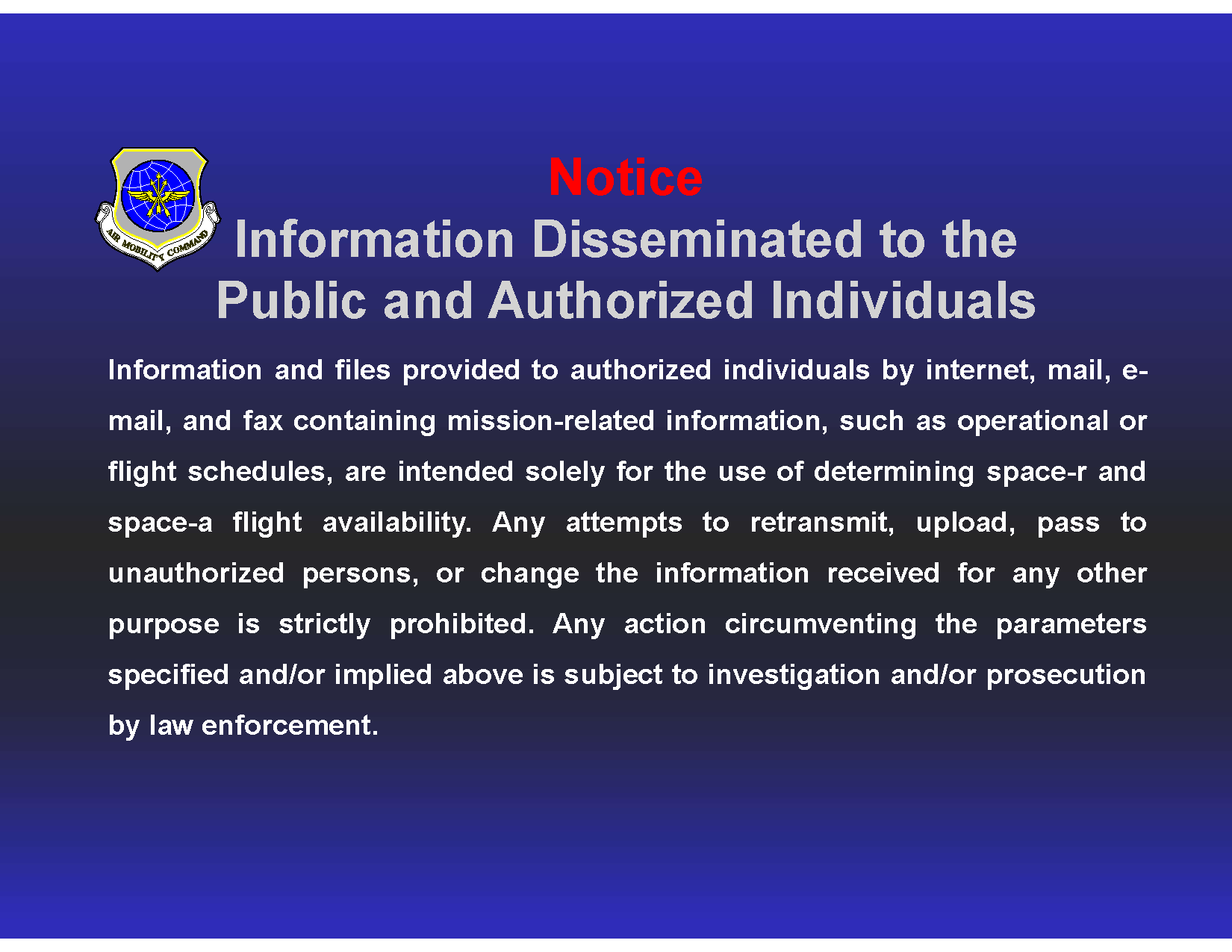
Page 1 — cover sheet. Terminal name, current date and time of the report, contact information, sign-up email, and a key/legend for the abbreviations used in the flight rows on the following pages. Most terminals' 72-hour PDFs follow this structure.
Pages 2–4 — flight tables. Each row is one flight. Columns vary slightly by terminal but typically include date, scheduled departure time, roll-call time, destination(s), Space-A seat count, and a status/code column. The "Code" column values map to the legend covered above (F = Firm, T = Tentative, TBD = To Be Determined).
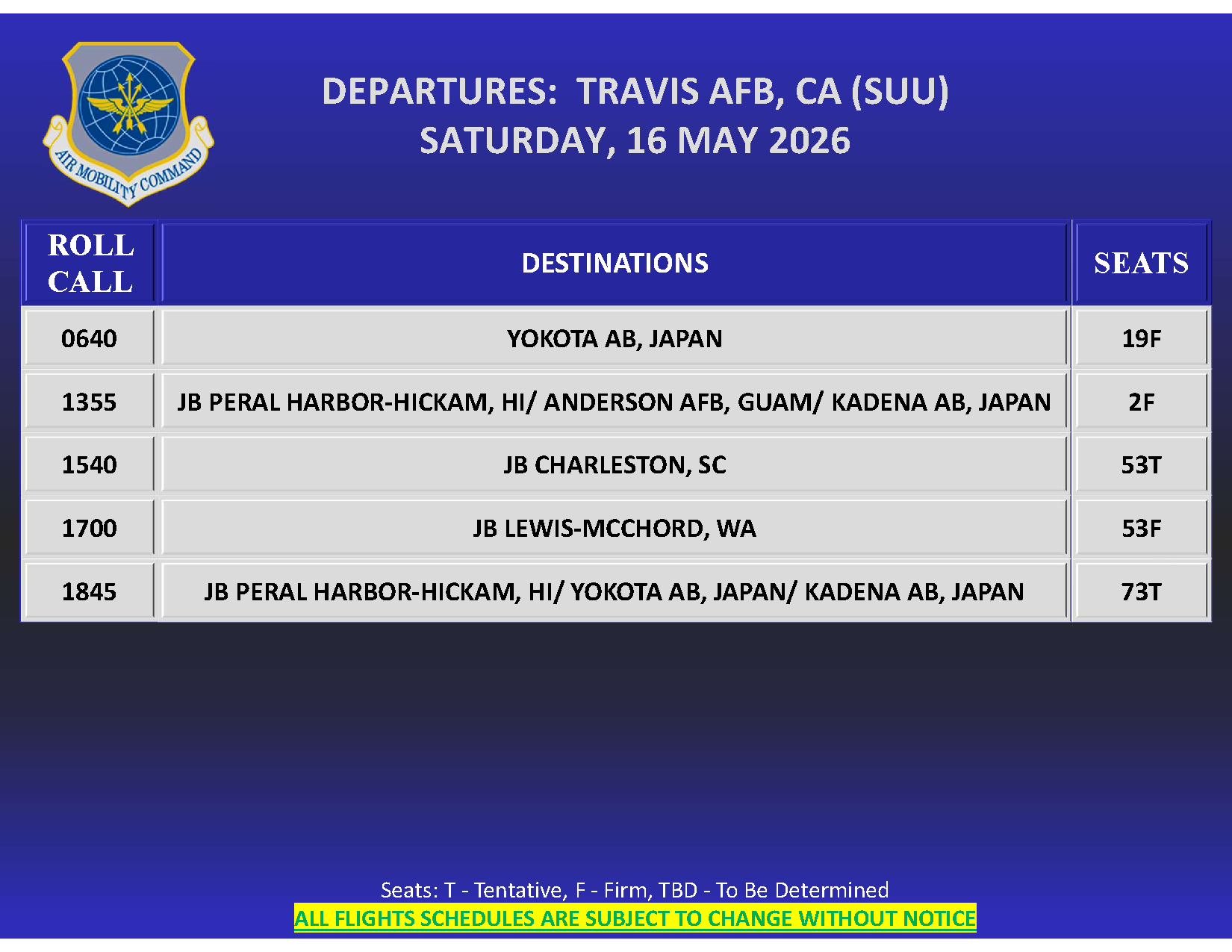
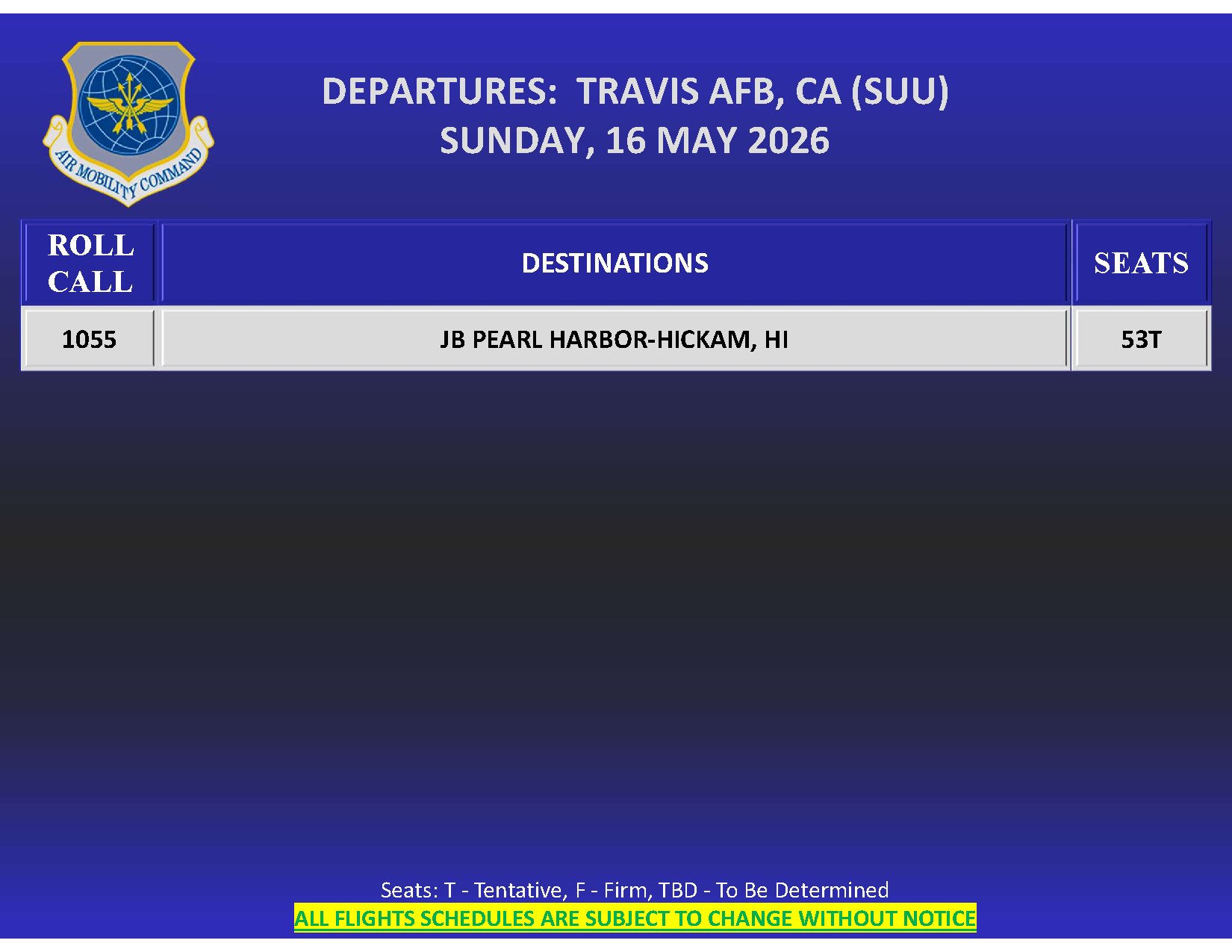
Notice the patterns across the flight rows: most have a numeric seat count, but some have "TBD" or "0". Roll-call times are listed in local terminal time. Multi-stop missions show destinations in route order.
What live data looks like at a single terminal
The PDF above is a snapshot from one moment. The live Browse Flights board renders the same data continuously, updating every 10 minutes from each terminal's posting. Here's a live snapshot from Travis — the most-trafficked CONUS terminal:
Live flights — Travis AFB, CA
See all →| Date | To | Seats |
|---|---|---|
| 2026-10-19 | JB Pearl Harbor-Hickam, HI | — |
The full Browse Flights board aggregates across all 40 tracked terminals into one filterable view, so the "watch every terminal for my route" workflow doesn't require visiting 40 separate PDFs.
What's NOT on the 72-hour schedule
A few things the schedule doesn't tell you — worth knowing in advance so you don't waste time looking:
- Passenger count by category. You can't see who's signed up. The closest signal is historical roll-call results from past flights on the same route — see the route history below.
- Crew rest constraints. Sometimes a crew arrives but is on rest and won't fly out for 12+ hours. The schedule shows the outbound time but not the inbound timing relationship.
- Baggage allowance details. Smaller aircraft can impose tighter per-passenger baggage limits. The 72-hour schedule doesn't tell you the per-flight allowance.
How to use the schedule strategically
Strategy 1: Watch inbound, predict outbound.
A crew that just landed at Ramstein after a transatlantic flight will almost always fly back west within 24–36 hours. If three transatlantic crews land at Ramstein on Tuesday, expect three transatlantic flights to post on the 72-hour board for Wednesday or Thursday. The arrivals view is the leading indicator.
Strategy 2: Use historical route data to set expectations.
The 72-hour schedule shows what's posted to fly. It doesn't show how well that route typically clears or which months of the year have more capacity. The Space-A+ database holds the full history of flights and roll-call results on each tracked route — pull up a specific route and you can see cadence, average seat releases, and how the route behaves seasonally. The widget below is the canonical Pacific PE route (Travis → Hickam):
Travis AFB, CA → JB Pearl Harbor-Hickam, HI · trailing 12 mo
Plan this route →184
flights
42.9
avg seats released
39.9%
avg fill
Flights per month
Oct
Nov
Dec
Jan
Feb
Mar
Apr
May
Jun
Jul
Aug
Sep
Oct
Pairing the live 72-hour view with this historical context is the most useful combination on the site. A flight that posts looking thin on seats may still be a reliable route on average; a flight that posts looking fat may be the rare exception on a thin route.
Strategy 3: Trust the recent timestamp.
A flight 8 hours out with a 2-hour-old timestamp has roughly the right seat count. A flight 36 hours out with a 24-hour-old timestamp could go anywhere. The further out and the older the timestamp, the more variance.
Strategy 4: Don't dismiss the "0 seats" flights too fast.
Some flights post with 0 estimated seats and release 20+ at roll call. This is rare but happens — especially on cargo missions where official-traveler counts shrink at the last minute. If a 0-seat flight is on a route you're trying to fly and you have the buffer, it's worth showing up anyway. Roll call is the only authoritative seat count.
Strategy 5: Cross-reference recent roll-call outcomes.
The schedule shows what should fly. Recent roll-call results show what actually boarded. Below are the most recent roll calls at Travis — useful as a sanity check on what's been clearing the route lately:
Recent roll calls — Travis AFB, CA
Terminal page →| Date | To | Released | Used | Lowest Cat |
|---|---|---|---|---|
| 2026-10-16 | Joint Base Andrews, MD | 19 | 3 | VI |
| 2026-10-16 | NAS North Island (NASNI) Coronado, CA | 19 | 0 | — |
| 2026-10-16 | JB Pearl Harbor-Hickam, HI · Osan AB, ROK · Yokota AB, Japan | 73 | 19 | VI |
| 2026-10-14 | JB Elmendorf-Richardson, AK · Yokota AB, Japan | 69 | 8 | VI |
| 2026-10-13 | JB Elmendorf-Richardson, AK · Yokota AB, Japan | 69 | 4 | VI |
| 2026-10-12 | JB Pearl Harbor-Hickam, HI · Andersen AFB, Guam | 0 | 0 | — |
| 2026-10-11 | Yokota AB, Japan · Osan AB, ROK | 3 | 1 | VI |
| 2026-10-11 | JB Pearl Harbor-Hickam, HI · Andersen AFB, Guam · JB Elmendorf-Richardson, AK | 0 | 0 | — |
| 2026-10-10 | JB Pearl Harbor-Hickam, HI | 73 | 10 | VI |
| 2026-10-10 | JB Pearl Harbor-Hickam, HI · Yokota AB, Japan | 73 | 18 | VI |
If a route on the 72-hour board hasn't cleared a passenger in two weeks of recent roll calls, treat the posted seat number with skepticism. If the same route has been releasing 30+ seats consistently, the next flight is likely similar.
Reading the schedule on Space-A+ specifically
The Space-A+ board adds features beyond the raw AMC posting:
- Multi-terminal view. See every flight from every tracked terminal in one list, filterable by destination and Space-A seat estimate.
- Historical context. Each flight links to historical fill data for the route — the last 30 days of flights, roll-call results, and category-by-category boarding patterns, plus the full database of past flights for deeper analysis.
- Inbound arrivals. Separate view showing recent arrivals at each terminal, sortable by origin.
- Alerts. Premium users can get immediate email notifications when a flight matching their saved route posts to the schedule.
The free Browse Flights board shows the live data. A Space-A+ account adds saved routes, alerts, and the Plan a Trip feature that handles multi-terminal sign-up automatically on both outbound and return legs.
A few practical things to watch for
A handful of patterns are worth being aware of when reading any 72-hour schedule:
- "19 seats" on a cargo aircraft is usually a load-planning default, not a hard cap. Pack light and the cap can be exceeded.
- Trust schedules less the further out they are. Schedule slips, mission re-taskings, and aircraft swaps happen most often in the 24-to-36-hour window before departure. The day-of view is the most reliable.
- Watch local time vs. Zulu. Sign-up timestamps are recorded in Zulu (per DAFI 24-605V2 § 2.29.1, with § 2.25.4 also referencing Julian date and Zulu time), but schedule roll-call times are usually shown in the terminal's local time. Don't mix them when planning your arrival.
- One terminal's board only shows that terminal. If you're chasing a route that runs from multiple terminals, watch them together — the multi-terminal view on Browse Flights is built for this.
Questions we hear
FAQ
Why does the seat count change between updates?
Cargo load, official-traveler bookings, weight allowances, and aircraft swaps all affect seat capacity. The estimate is recalculated as those inputs change. Variance is normal; the final authoritative number is announced at roll call.
Can I see how many people are signed up for a flight?
Not directly. The terminal doesn't publish the backlog. The closest signal is historical roll-call results from past flights on the same route — see Browse Flights for what's actually been clearing.
What does "TBD" mean in the seat count column?
The seat estimate hasn't been generated yet. Usually resolves to a real number 12–24 hours before scheduled departure, sometimes only at roll call. TBD flights are speculative — don't plan around them, but check back closer to departure.
Why do some flights have 0 seats but still post on the schedule?
Flights are posted on the schedule once mission tasking is confirmed. Seat counts come later. A 0-seat flight could open up at roll call if official-traveler counts drop. Worth a try if you have the time buffer.
Should I check terminal Facebook pages for the schedule?
Most terminals have moved schedule posting off Facebook and onto their official AMC sites. Some still cross-post, but the terminal's AMC page is the authoritative source. Space-A+ aggregates from the official AMC channels.
How far in advance is the schedule reliable?
The first 24 hours are reasonably reliable — most flights at that horizon will go on time and within ±50% of the listed seat count. The 24–48-hour window has moderate reliability. The 48–72-hour window has the most variance — use it for planning, not commitment.
See live flights right now
See what's flying right now.
Live 72-hour board across every Space-A terminal we track. Filter by region, search by destination.
Browse flights →Related reading

Patriot Express vs. True Space-A: What's the Difference in 2026
AMC's Patriot Express commercial rotators and cargo Space-A missions share a sign-up but almost nothing else. The operational comparison — schedule, fees, pets, baggage, delays, boarding priority.
Tips & Data

5 Things First-Time Space-A Travelers Get Wrong (And How to Fix Them)
Five fixable mistakes most first-time Space-A travelers make — and the playbook for avoiding each one before your first flight.
Tips & Data

Cat VI Space-A Travel: Realistic Expectations in 2026
What Cat VI Space-A travel actually looks like in 2026: real selection rates, route restrictions, and what success means as the lowest-priority traveler.
Tips & Data